Mixing & Mastering Tip #229 ·
Why your export sounds different: check plugin offline settings

Ruslan Slatin
Mastering engineer at SLATIN, Madrid
A few years ago, I had an existential crisis.
I was finishing a five-song album and kept re-exporting. Listening. Comparing. Fixing. Exporting again.
Something always felt off.
Everything sounded great inside the DAW, but as soon as I rendered, the vibe completely shifted.
I found myself tweaking parameters blindly in the DAW, re-exporting again and listening to the result. It took me forever to finish that album.
The default that changed everything
Surprisingly, I found the culprit. It wasn’t the EQ, it wasn’t the limiter, not even my compressors. It was Soothe 2.
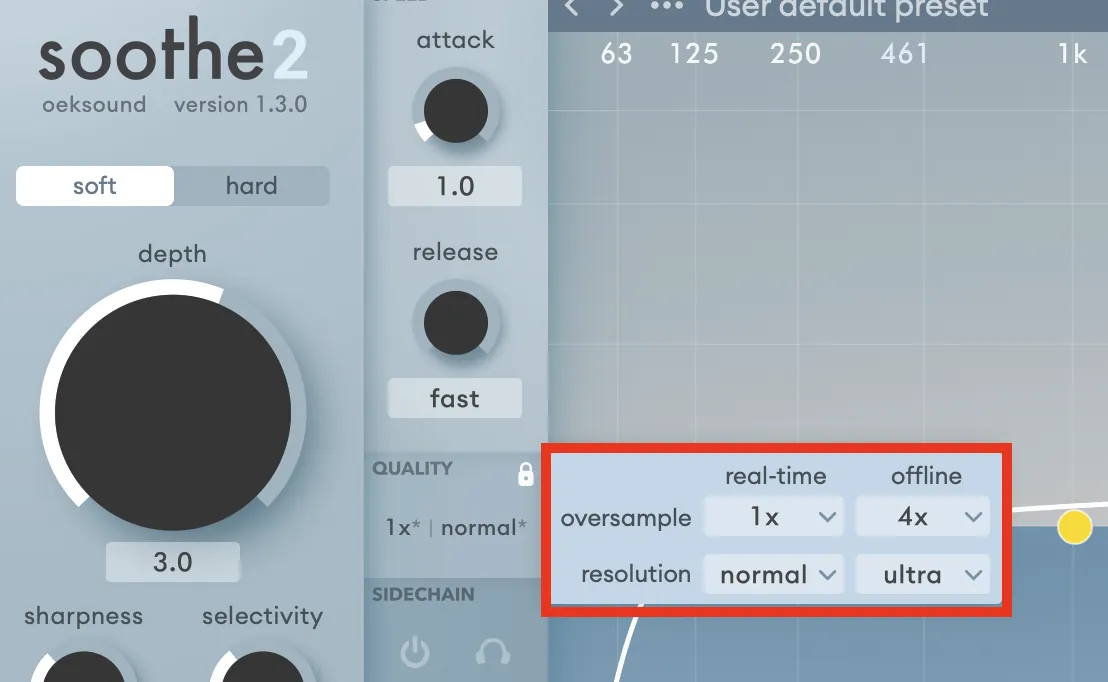
My default offline settings were: oversampling x4, resolution high.
Huge mistake.
I set it once when I installed the plugin and forgot about it.
But when I compared it properly to the online (real-time) settings, where I used no oversampling and lower resolution, it was very different.
Oversampling made the mix darker. Softer. No oversampling and “normal” resolution was the best setting for that song.
Why this happens
Oversampling isn’t just “better quality”. Change the oversampling and/or resolution and you change how the plugin processes audio.
In my case, it:
- Softened transients in the highs (at least perceptually)
- Smoothed the top end (dark song)
- Reduced energy more than I realized
Soothe can trick you into thinking it’s better. But “higher quality” doesn’t always mean better sound.
And when you use different settings for offline, you are simply not listening to the final outcome while you work on the session.
The real takeaway
If your export feels smaller or darker than your session, or simply sounds different, check the offline settings of your plugins. That tiny oversampling checkbox might be shifting your whole vibe.

Also try rendering in real time instead.
Want this on your own track?
I master more than 1,000 songs a year for artists and labels, from stems or a stereo mix. Send me your track and I'll tell you what it needs.
A new tip like this every week, free: join the newsletter.
Work with me
Whenever you're ready, here's how I can help.
 MentoringMix & Master AcceleratorWeekly video reviews of your tracks, live group calls, and the business side of a studio career.By applicationApply now
  Preset packFUSION150 hand-crafted Valhalla VintageVerb presets. Three clicks to the sound you already hear in your head.20€Get the pack
  CourseAdvanced MicrodynamicsFour hours on the micro-level movement that makes a mix feel alive. Joined by 220+ students.149€See the course
  CourseLow End MasteryKick and bass chemistry, so your low end lands on club rigs and earbuds alike. Joined by 500+ students.159€See the course
  SoftwareStudiOSThe software I run my own studio on: deliveries, client feedback, versions and invoices in one place.14 days freeTry StudiOS