Mixing & Mastering Tip #186 ·
Ableton multicore vs one core: when to switch multicore on or off

Ruslan Slatin
Mastering engineer at SLATIN, Madrid
@maxforlive_vstopia recently shared an Ableton CPU optimization tip, and it felt like a great moment to remind you how Ableton manages processing.
If your Ableton session is starting to feel like it’s chugging a little, or if you’re wondering when to flip that “Multicore” switch on or off, here’s the breakdown.
This is all about how Ableton uses your CPU, and more specifically, how it deals with cores and threads.
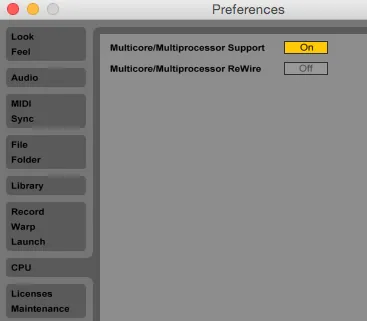
When to stay on one core
Yes, sometimes less is more. If your project is:
- A small idea sketch
- Built with grouped tracks, sidechaining or routing magic
- Focused on zero-latency monitoring or super tight timing (live events)
then keeping it all on one core is actually smart.
Why? Because the second you start splitting audio tasks across multiple cores, they need to talk to each other. And that chat takes time.
Every thread waits for the others to finish, which means more buffering and more dropouts. In real-time audio, that’s death.
When multicore is your best friend
Now, got a massive session? Dozens of unrelated tracks? Or you’re bouncing stems or rendering full mixes?
Then go multicore. Here’s when it shines:
- Projects with independent layers (no routing between them)
- Heavy synths like Diva, Pigments or Serum, each on their own channel
- Final renders (not real-time), where timing delays don’t matter
Multicore lets each of those tracks grab its own CPU slice. So instead of choking one poor core, you’re spreading the load like a pro chef at a buffet.
Bonus nerd note
Ableton leans toward serial processing when audio is tightly linked, because it’s safer and smoother that way. You’ll actually get better performance on one core sometimes, even if you’ve got a multi-core monster machine.
So don’t be afraid to tweak this based on your session.
Want this on your own track?
I master more than 1,000 songs a year for artists and labels, from stems or a stereo mix. Send me your track and I'll tell you what it needs.
A new tip like this every week, free: join the newsletter.
Work with me
Whenever you're ready, here's how I can help.
 MentoringMix & Master AcceleratorWeekly video reviews of your tracks, live group calls, and the business side of a studio career.By applicationApply now
  Preset packFUSION150 hand-crafted Valhalla VintageVerb presets. Three clicks to the sound you already hear in your head.20€Get the pack
  CourseAdvanced MicrodynamicsFour hours on the micro-level movement that makes a mix feel alive. Joined by 220+ students.149€See the course
  CourseLow End MasteryKick and bass chemistry, so your low end lands on club rigs and earbuds alike. Joined by 500+ students.159€See the course
  SoftwareStudiOSThe software I run my own studio on: deliveries, client feedback, versions and invoices in one place.14 days freeTry StudiOS