Mixing & Mastering Tip #198 ·
How to draw your own groove with MAutoDynamicEQ's modulation

Ruslan Slatin
Mastering engineer at SLATIN, Madrid
If you’ve been following me for a while, you know I love tools that give you total control over dynamics, and MAutoDynamicEQ is one of them.
This one goes way deeper than your usual sidechain or envelope trickery: modulation lanes.
The hidden feature
Inside the plugin, there’s a modulation area you can toggle on.
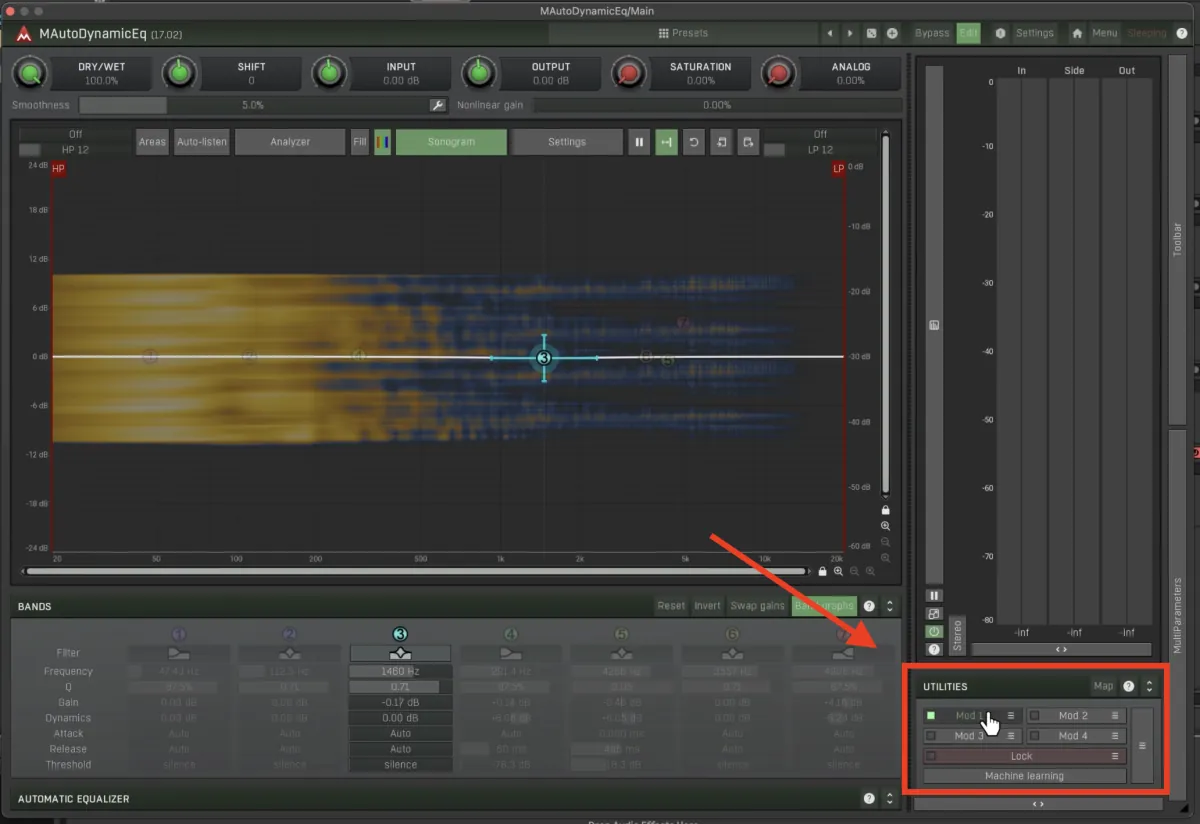
What does it do? It lets you modulate any parameter of the plugin: gain, frequency, filter slope, you name it. But the juicy part is that you get to draw your own rhythm directly into it.
This is gold when:
- You want surgical control over bounce, movement and microdynamics
- You’re bored of basic sidechain and want something more expressive
Step by step: drawing your first modulation
Here’s how I set it up:
- Open the modulation section.
- Pick a parameter. I used the Band 3 gain.
- Set your min/max range. I did 0 to +3 dB for a little lift.

- Draw the movement you want.
- Sync it to your BPM, and you have a custom groove ready to go.


And here’s the magic: you’re basically doing a reverse sidechain. Instead of ducking reactively, you’re creating dynamic shifts proactively.
Shape = bounce
Don’t sleep on the curvature tools. That little slope totally changes the feel:
- Snappy attack: punchy, aggressive rhythm
- Draggy rise: lazy, swaying groove
This isn’t just a “nice to have”. It affects the vibe of your whole track.
Add stereo motion with mid/side
If you really want to spice it up, flip into mid/side mode and apply that movement to just the sides.
Modulating side-only gain or frequency with your custom shape creates stereo motion that feels alive. Perfect for pads, textures or wide FX.
Just don’t slap this on your master. It’s not built for that. But on individual elements, it’s a different story.
Want this on your own track?
I master more than 1,000 songs a year for artists and labels, from stems or a stereo mix. Send me your track and I'll tell you what it needs.
A new tip like this every week, free: join the newsletter.
Work with me
Whenever you're ready, here's how I can help.
 MentoringMix & Master AcceleratorWeekly video reviews of your tracks, live group calls, and the business side of a studio career.By applicationApply now
  Preset packFUSION150 hand-crafted Valhalla VintageVerb presets. Three clicks to the sound you already hear in your head.20€Get the pack
  CourseAdvanced MicrodynamicsFour hours on the micro-level movement that makes a mix feel alive. Joined by 220+ students.149€See the course
  CourseLow End MasteryKick and bass chemistry, so your low end lands on club rigs and earbuds alike. Joined by 500+ students.159€See the course
  SoftwareStudiOSThe software I run my own studio on: deliveries, client feedback, versions and invoices in one place.14 days freeTry StudiOS