Mixing & Mastering Tip #203 ·
How SpecCraft before the limiter gets you 0.5 to 1 dB more loudness

Ruslan Slatin
Mastering engineer at SLATIN, Madrid
So you’ve got your track finished, limited and hitting hard. Nice.
But in louder genres you want to be sure you’ve pushed the limiter right up to its full potential. Once you’re at that point, you have a few tricks to squeeze out even more volume. One of my favourites is giving the limiter a little space to breathe.
The tool: SpecCraft
I do it with SpecCraft, my secret weapon. Think of it like Soothe, but way more precise (and quick). It’s a super flexible tool.
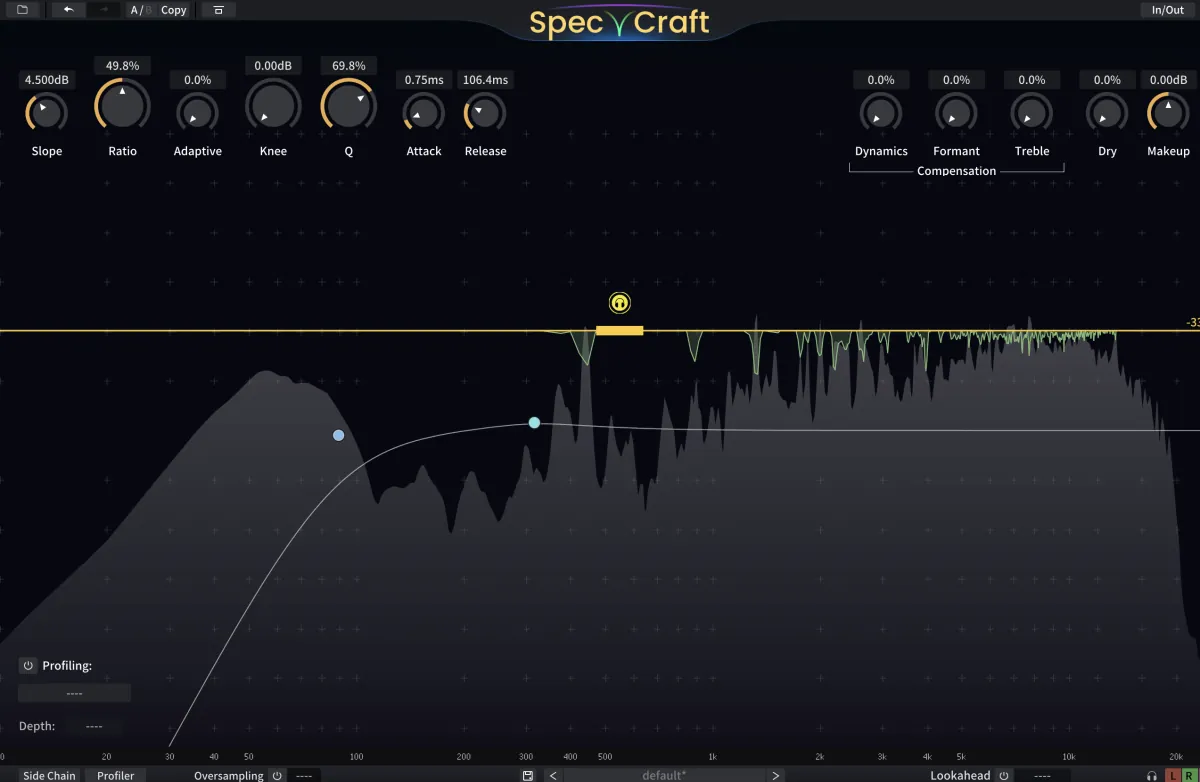
SpecCraft is more than a fixer: it’s a dynamic resonance suppressor, spectrum compressor and smart EQ all in one. It hunts down harsh shrills, boomy muddiness and unwanted resonances, and does it per audio frame with surgical precision.
What we’re really doing
We will not use it to remove resonances. We will use it to tame the loudest transient peaks across the frequency spectrum, from 100 Hz up.
Once SpecCraft compresses those sharp peaks, the limiter doesn’t freak out as quickly. That means you can usually push an extra 0.5 to 1 dB without nasty distortion.
How I set it
- Set the filter to 100 Hz, so we’re focusing above the low end.
- Drop the threshold until you see those initial peaks come down.
- Then experiment with the attack and release settings to make it more musical.
Just don’t overdo it. Push too hard and you’ll end up killing the sound instead of making it punchy.
Want this on your own track?
I master more than 1,000 songs a year for artists and labels, from stems or a stereo mix. Send me your track and I'll tell you what it needs.
A new tip like this every week, free: join the newsletter.
Work with me
Whenever you're ready, here's how I can help.
 MentoringMix & Master AcceleratorWeekly video reviews of your tracks, live group calls, and the business side of a studio career.By applicationApply now
  Preset packFUSION150 hand-crafted Valhalla VintageVerb presets. Three clicks to the sound you already hear in your head.20€Get the pack
  CourseAdvanced MicrodynamicsFour hours on the micro-level movement that makes a mix feel alive. Joined by 220+ students.149€See the course
  CourseLow End MasteryKick and bass chemistry, so your low end lands on club rigs and earbuds alike. Joined by 500+ students.159€See the course
  SoftwareStudiOSThe software I run my own studio on: deliveries, client feedback, versions and invoices in one place.14 days freeTry StudiOS